

Introduction
VRseBuilder is a comprehensive solution for creating and delivering interactive VR experiences. Whether for training, education, or entertainment, the platform provides the tools and framework needed to build engaging VR content.Technology Stack
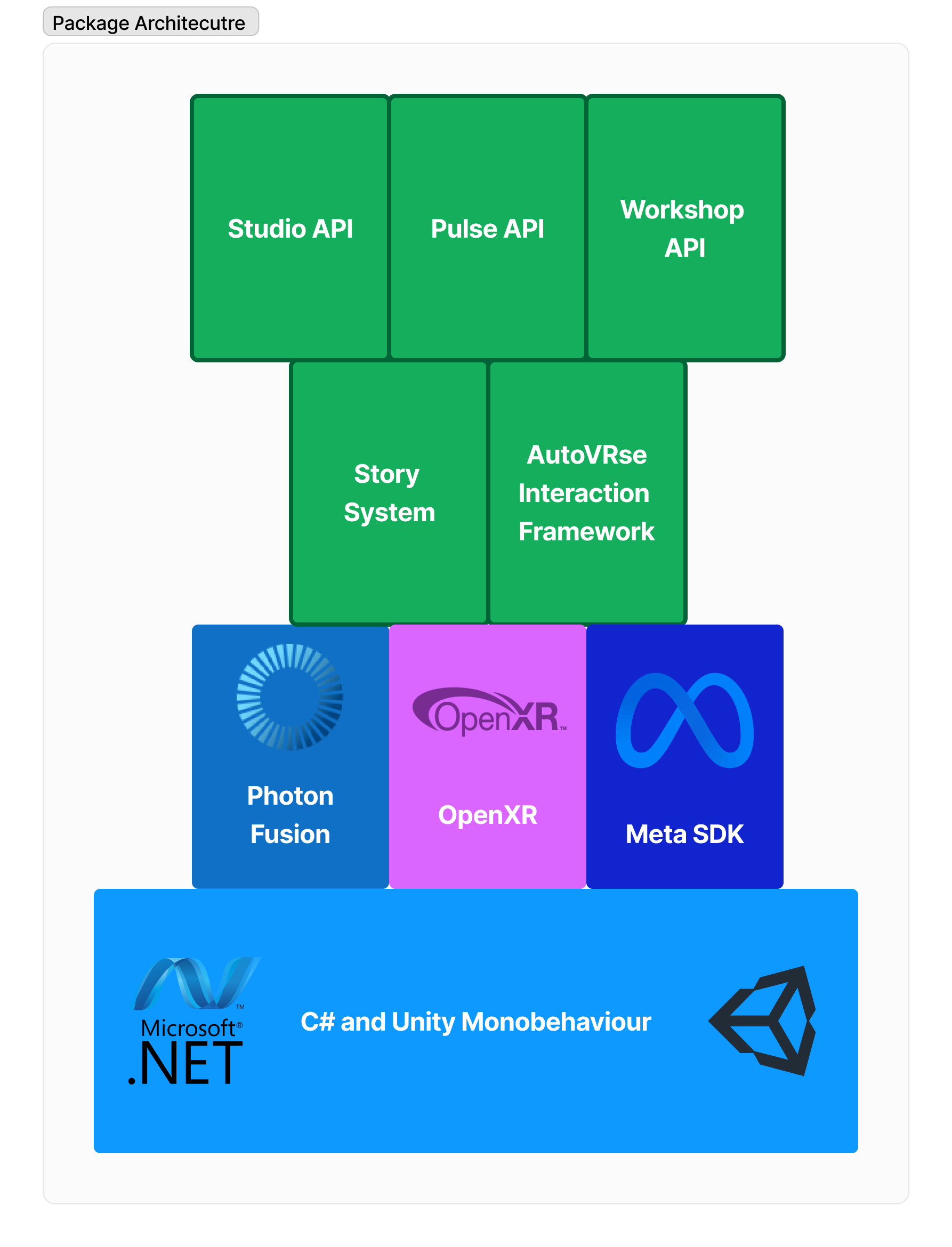
Layer Details
Foundation Layer
- Unity Engine: Provides core game engine functionality
- .NET Framework: Offers programming infrastructure
VR Integration Layer
- Meta SDK: Direct Oculus hardware integration
- OpenXR: Cross-platform VR compatibility
Core Framework Layer
- AutoVRse Interaction Framework: Custom VR interaction system
- Photon Fusion: Networking and multiplayer
Application Layer
- Story System: Experience management
- Studio API: Connecting to AI story generator and editor
- Pulse API: Connecting to Analytics dashboard
- Workshop API: Connecting to Infinity workshop to bring 3D content
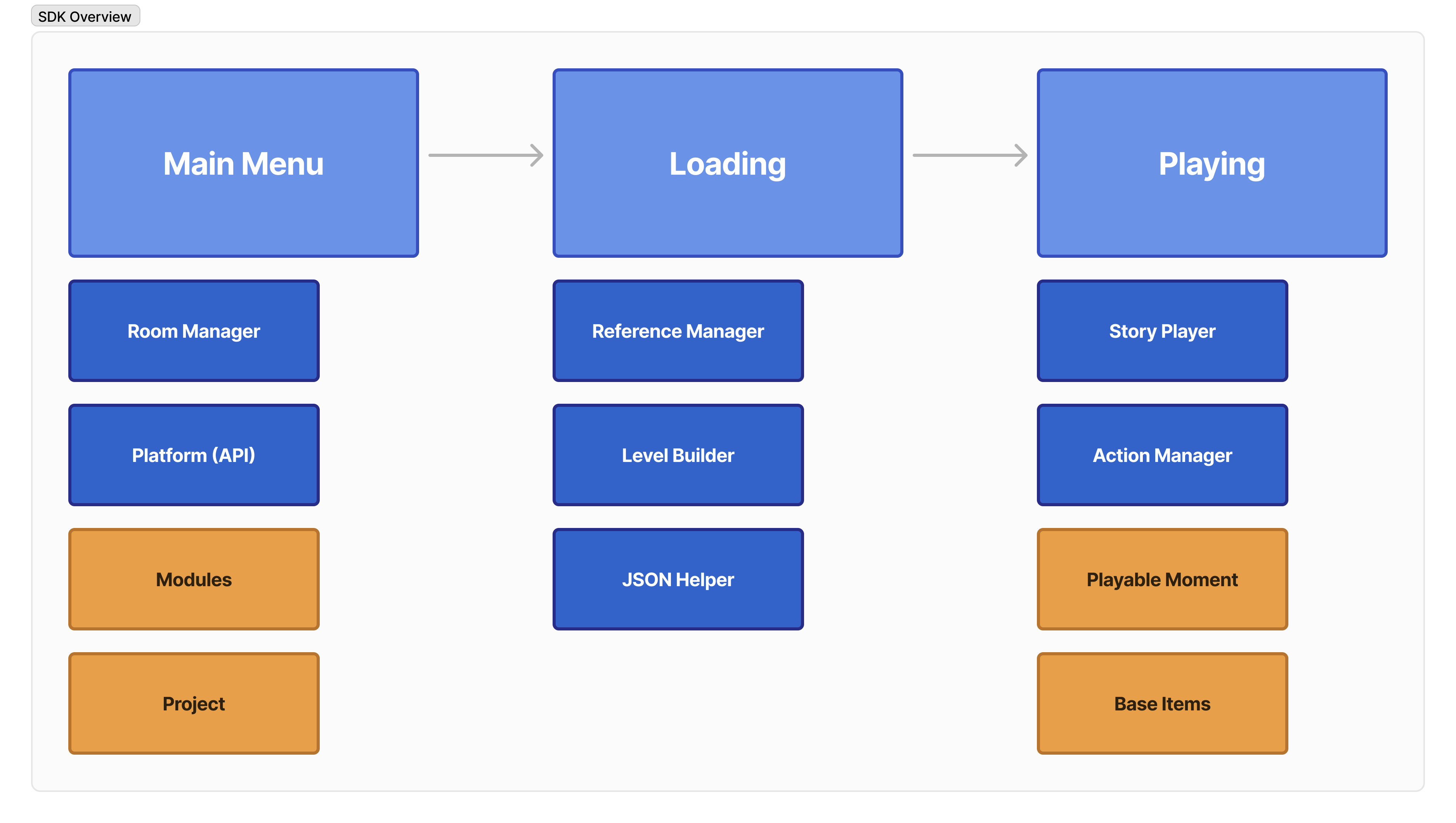
The Runtime Flow
This section will go over what exactly happens under the hood when a user is experiencing your content in VRBreaking down a Story
- The entire experience is a Story
- The story is divided into Chapters
- Each chapter contains Moments
- Moments are made up of Actions and Triggers
1. Story Loading
When a user starts an experience:- The system loads the story JSON file
- Sets up required resources and scenes
- Prepares the first chapter
2. Chapter Execution
A chapter represents a major section of the experience:- Manages its sequence of moments
- Controls transitions between moments
- Handles chapter-specific resources
3. Moment Playback
Moments are individual interactive sequences:- Can play voice-overs
- Move or animate objects
- Wait for user interactions
- Update UI elements
4. Action/Trigger Loop
The core interaction loop within moments:- Execute actions (like showing a message)
- Wait for triggers (like user grabbing an object)
- Execute more actions in response
- Move to next moment when complete
Key Manager Classes
Example Flow
For a simple training scenario:- Story Starts
- Load training environment
- Set up initial state
- Chapter Begins
- “Introduction to Lab Equipment”
- Prepare lab scene
- First Moment
- Action: Play voice-over “Pick up the beaker”
- Action: Highlight the beaker
- Trigger: Wait for user to grab beaker
- Action: Play success sound when grabbed
- Next Moment
- Action: Play voice-over “Place beaker on marked spot”
- Action: Highlight target location
- Trigger: Wait for correct placement
- Action: Move to next moment
Two Core Systems
1. Action System
- Handles everything the system DOES
- Examples:
- Playing voice-overs
- Moving objects
- Showing UI elements
- Playing animations
2. Trigger System
- Handles everything the system WAITS FOR
- Examples:
- User grabbing objects
- Objects colliding
- Timers completing
- Objects being placed correctly
The JSON Connection
All experiences are defined in JSON:- Defines the structure of the experience
- Specifies what happens in each moment
- Controls the flow between moments
- Can be created through tools or hand-written
Real World Example
A lab safety training experience might look like:- Story: Lab Safety Training
- Chapters:
- Introduction to Lab
- Safety Equipment
- Emergency Procedures
- Moments (in Safety Equipment chapter):
- Locate safety goggles
- Put on safety goggles
- Find fire extinguisher
- Learn extinguisher operation
- Actions/Triggers (in “Put on safety goggles” moment):
- Action: Highlight goggles
- Action: Play voice-over instruction
- Trigger: Wait for user to grab goggles
- Action: Guide goggles to face
- Trigger: Wait for correct placement
- Action: Play success feedback