Introduction
VRseBuilder helps teams build VR training applications from an idea to a headset-ready APK.
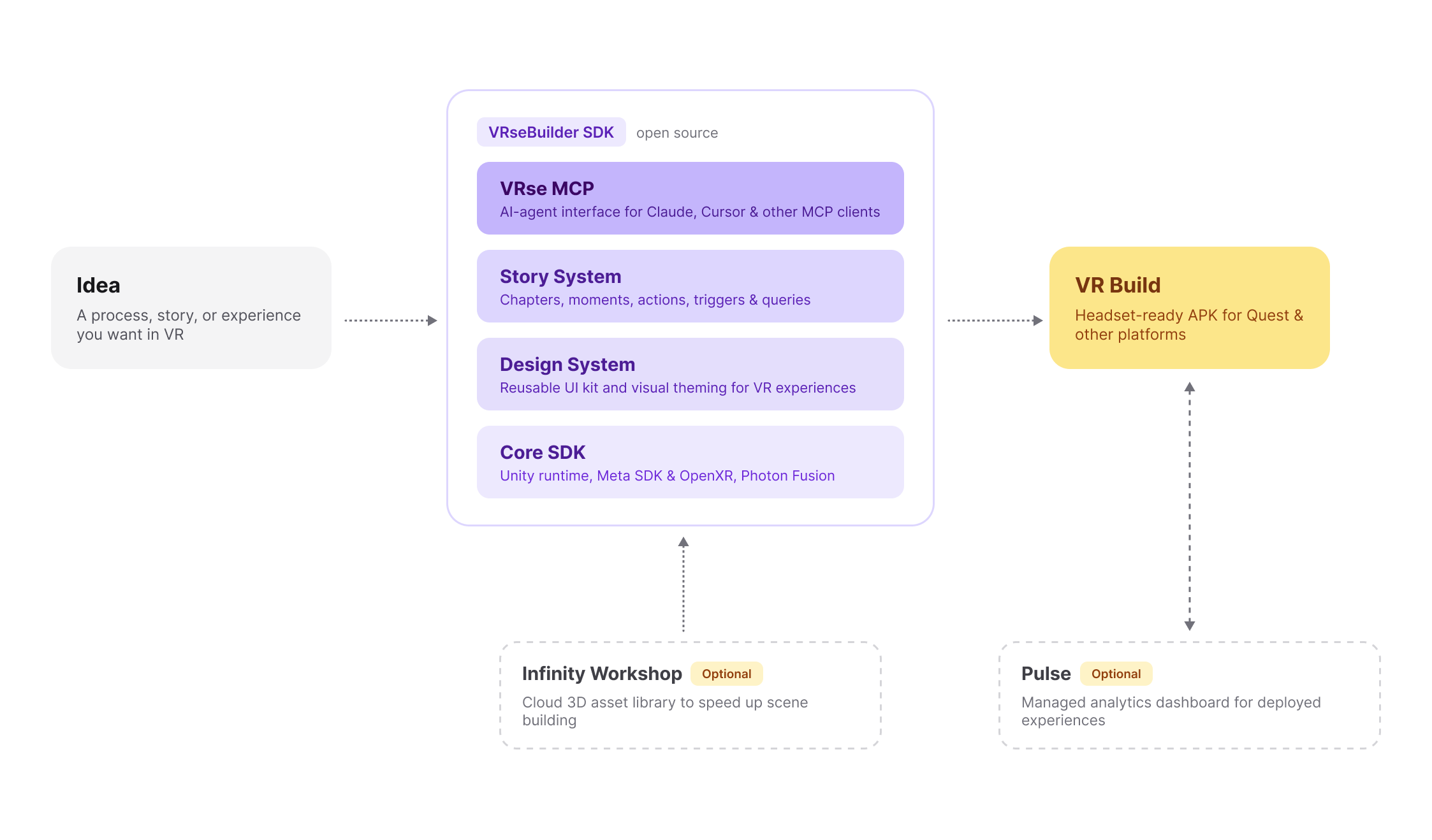
It combines a natural-language MCP workflow, a Unity SDK, a story system, and a reusable design system so you can create structured VR training without starting from scratch every time.
How It Works
- Start with the training idea
Define what the learner should practice, what environment they need, and what actions they must perform.
- Build the scene
Bring your own assets, or use Infinity Workshop* to source VR-ready assets from AutoVRse's library.
- Generate the experience with MCP
Use natural language to set up scene objects, interactions, and story flow through the VRseBuilder MCP workflow.
- Fine-tune in Unity
Use the Unity SDK to test, adjust interactions, add custom behavior, and prepare the module for deployment.
- Deploy and measure
Build the APK for your headset fleet or MDM, and optionally connect Pulse Dashboard* for training insights.
*Infinity Workshop and Pulse Dashboard are optional services. Contact us if you want either enabled for your project.
Getting Started
Start here based on what you want to do next.