> ## Documentation Index
> Fetch the complete documentation index at: https://docs-vrsebuilder.autovrse.app/llms.txt
> Use this file to discover all available pages before exploring further.
# Voiceovers (TTS Service)
> AI generated voice overs in multiple languages
Every **VoiceOver** action you have in your story, makes use of TTS services that are attached to your account. You would have setup the same in the [Project Configuration](unity-sdk/project-config-files#project-config)
 ## OpenAI TTS
OpenAI TTS Service - [https://platform.openai.com/docs/guides/text-to-speech](https://platform.openai.com/docs/guides/text-to-speech)
## VoiceMaker (Multi-Language Support)
Read more about services here: [https://voicemaker.in](https://voicemaker.in)
### **Setup**
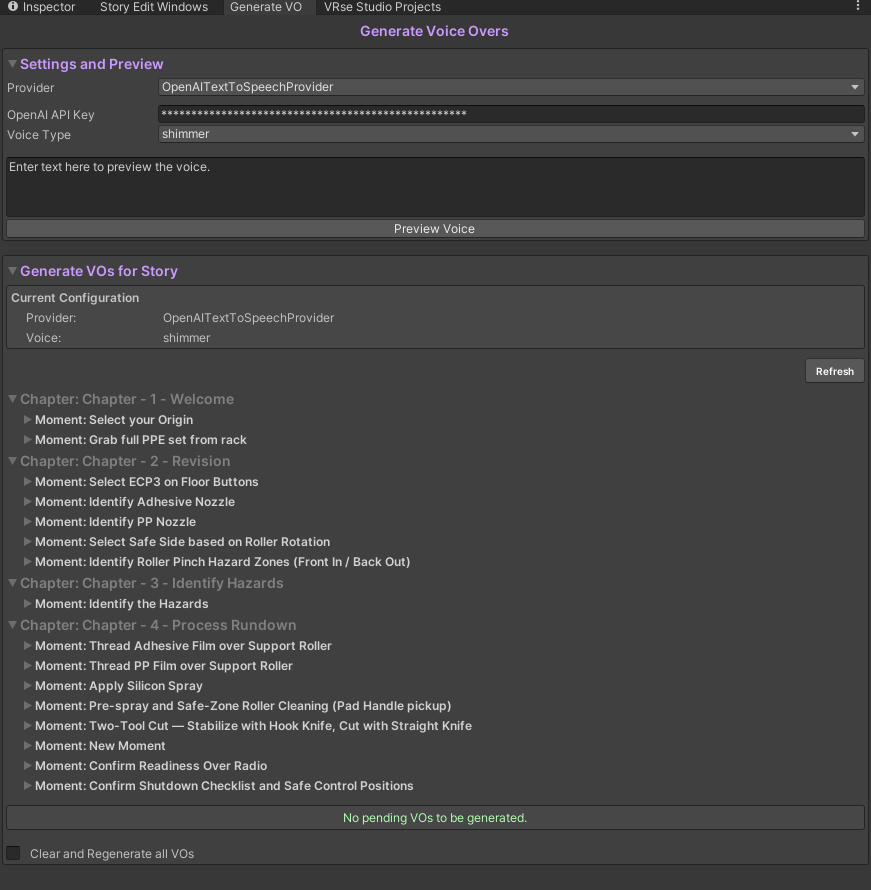
Go to the **Generate VO** **Window** from the bottom of the Story Creator, you will see a window like as shown above
In the \*\*Settings & Preview \*\*section, change provider from OpenAITextToSpeechProvider to ****VRBAPITextToSpeechProvider and click onApply Settings****
In the preview you will be able to apply settings for english only, the rest of the languages are for preview purposes only.
If you are using Localization and wish to set different voices for different languages, go to\
`Edit > Project Settings > VRseBuilder > Text to Speech` It will look like the Image below
## OpenAI TTS
OpenAI TTS Service - [https://platform.openai.com/docs/guides/text-to-speech](https://platform.openai.com/docs/guides/text-to-speech)
## VoiceMaker (Multi-Language Support)
Read more about services here: [https://voicemaker.in](https://voicemaker.in)
### **Setup**
Go to the **Generate VO** **Window** from the bottom of the Story Creator, you will see a window like as shown above
In the \*\*Settings & Preview \*\*section, change provider from OpenAITextToSpeechProvider to ****VRBAPITextToSpeechProvider and click onApply Settings****
In the preview you will be able to apply settings for english only, the rest of the languages are for preview purposes only.
If you are using Localization and wish to set different voices for different languages, go to\
`Edit > Project Settings > VRseBuilder > Text to Speech` It will look like the Image below
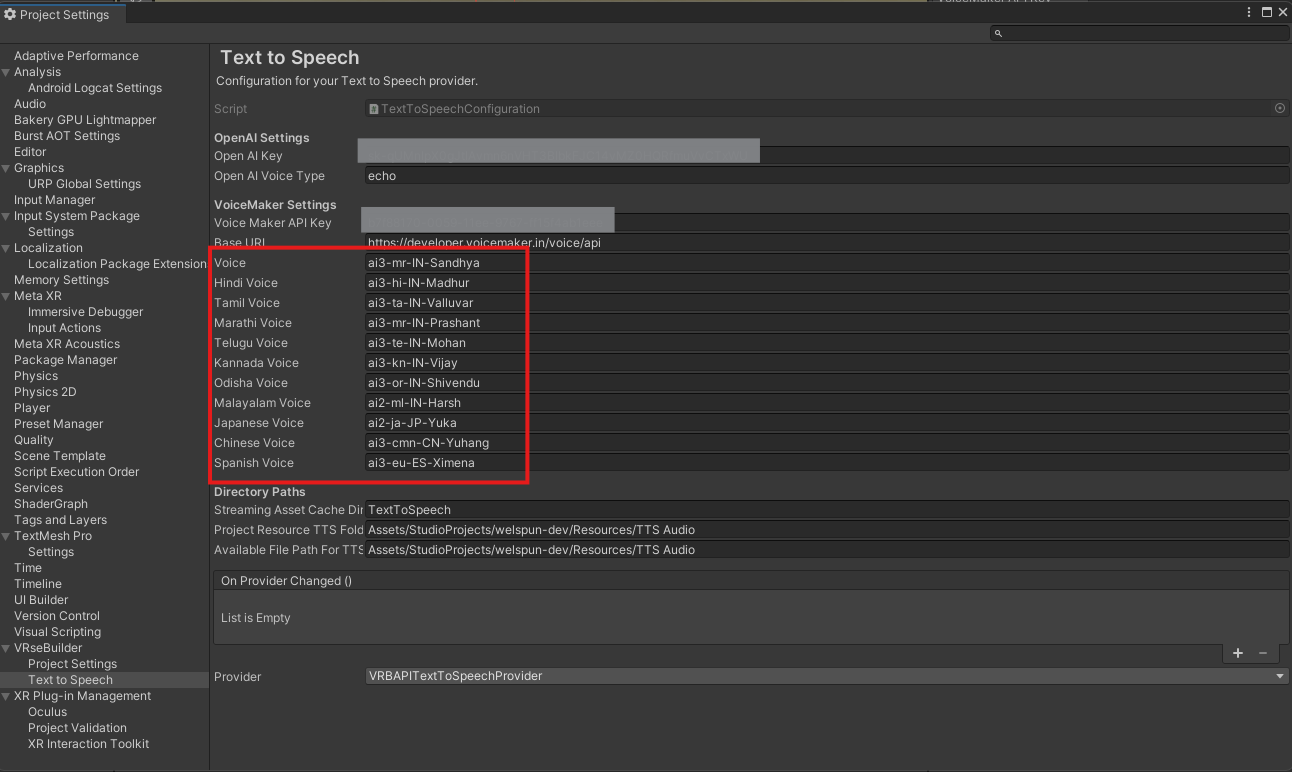 You can set your voice options, chose from the options below, based on the authorisation of your VoiceMaker account, you can chose the language codes available for you. The first option of "Voice" is meant for the default language of your voiceovers
**Recommended Voices**
| Language | Code |
| -------- | --------------------------------------------------------------------------------- |
| English | ai3-en-US-Sophia
You can set your voice options, chose from the options below, based on the authorisation of your VoiceMaker account, you can chose the language codes available for you. The first option of "Voice" is meant for the default language of your voiceovers
**Recommended Voices**
| Language | Code |
| -------- | --------------------------------------------------------------------------------- |
| English | ai3-en-US-Sophia
ai3-Jony
ai3-en-US-Zenith
ai3-Evan |
| Hindi | ai3-hi-IN-Vihaan
ai3-hi-IN-Saanvi
ai3-hi-IN-Karan
ai3-hi-IN-Ankita |
| Tamil | ai3-ta-IN-Pallavi
ai3-ta-IN-Valluvar |
| Telugu | ai3-te-IN-Shruti
ai3-te-IN-Mohan |
| Marathi | ai3-mr-IN-Sandhya
ai3-mr-IN-Prashant |
You can find a list of more valid voice APis here: [https://developer.voicemaker.in/apidocs/list-of-all-voices](https://developer.voicemaker.in/apidocs/list-of-all-voices)
## Add a Custom Voiceover Provider
Read how to add your own API for Voiceovers in this handy guide of [Add your Own TTS Provider](/creation-suite/guides/add-your-own-tts-provider-for-voiceovers), you will need a Developer to help you do the same