Introduction
The VRseBuilder Unity SDK is the runtime and editor framework used to build interactive VR stories inside Unity. It gives you the core systems needed to set up a project, connect scene objects to story logic, configure interactions, test experiences, and create builds for headset deployment.
Use this page as a high-level map of how the SDK fits together before moving into setup, interactables, actions, triggers, and builds.
What the SDK Provides
The SDK sits on top of Unity and adds VRseBuilder-specific systems for story playback, interaction authoring, project configuration, networking, UI, and runtime services.
| Area | What it helps you do |
|---|---|
| Story playback | Run chapters and moments in sequence using actions and triggers. |
| Scene object linking | Connect story references to real Unity GameObjects through query objects. |
| Interactables | Create grabbables, place points, touch objects, ray interactables, and other VR interaction targets. |
| Editor tooling | Use VRseBuilder windows and overlays to configure projects, modules, objects, and story nodes. |
| UI systems | Create spatial panels, media panels, checklist UI, MCQs, and Glass UI interfaces. |
| Build support | Configure project settings and generate headset builds from Unity. |
| Advanced runtime features | Enable multiplayer, mixed reality, localization, hand tracking, feedback, and story navigation. |
Technology Stack
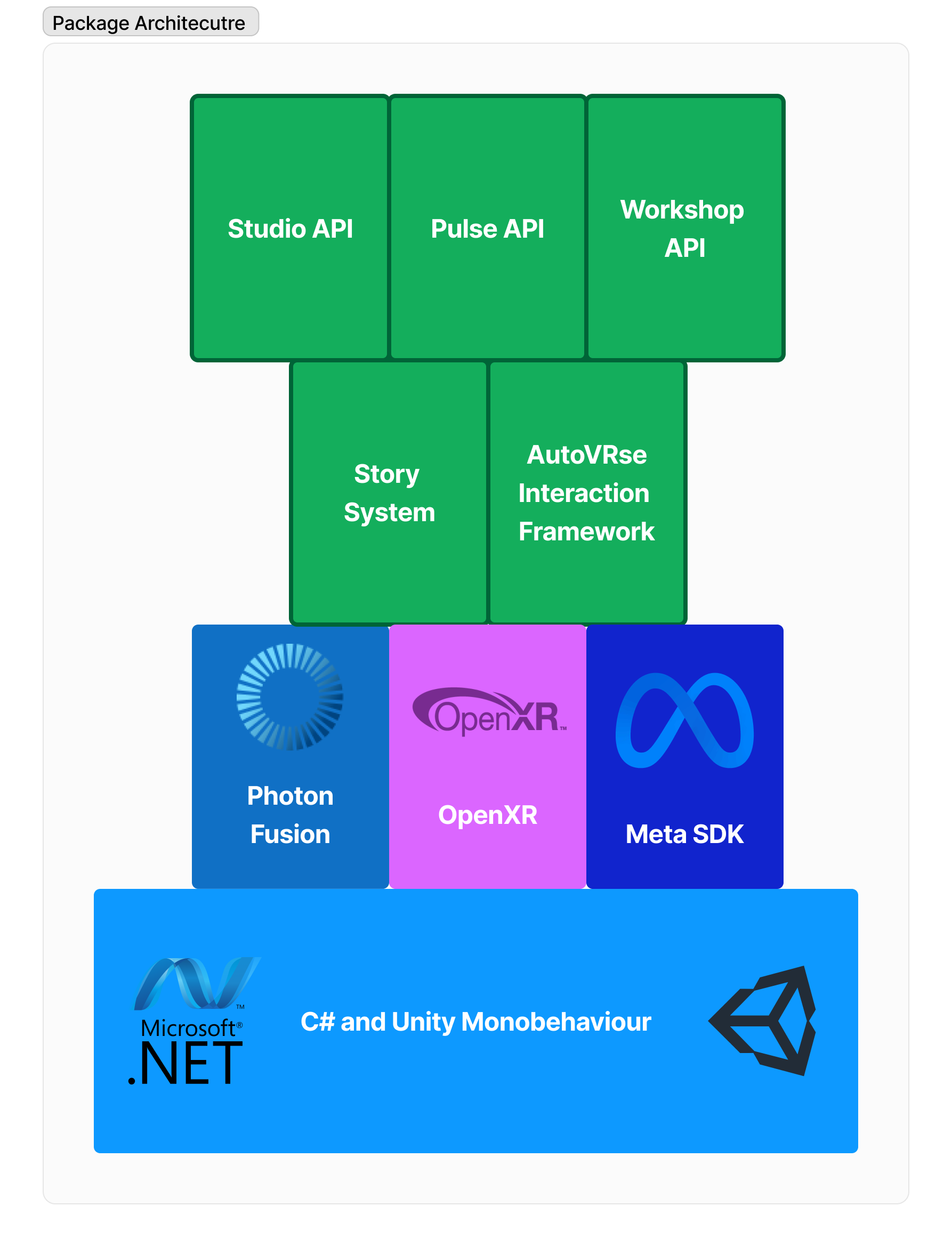
The SDK is built as a layered Unity framework. Unity provides the foundation, VR integrations provide headset support, and VRseBuilder adds story, interaction, networking, UI, and tooling systems.
Foundation Layer
- Unity Engine provides rendering, physics, scenes, assets, prefabs, animation, and core runtime behavior.
- .NET / C# provides the programming environment for SDK systems and project-specific extensions.
VR Integration Layer
- Meta SDK provides Quest-focused headset, controller, hand tracking, passthrough, and interaction capabilities.
- OpenXR provides a path for broader XR compatibility where supported by the project.
Core Framework Layer
- AutoVRse Interaction Framework provides reusable VR interaction patterns such as grabbing, placing, touching, highlighting, and user guidance.
- Photon Fusion supports multiplayer experiences where multiple users share the same story space.
Application Layer
- Story System runs chapters, moments, actions, triggers, warnings, and completion flow.
- Project configuration stores module metadata, backend URLs, login settings, TTS settings, Photon settings, build settings, and scene references.
- Runtime UI systems provide menus, experience panels, media panels, checklists, MCQs, and other in-VR interfaces.
Application Layer
The application layer is where most VRseBuilder authoring work happens. It connects your Unity scenes, story data, object references, and runtime systems into one playable VR experience.
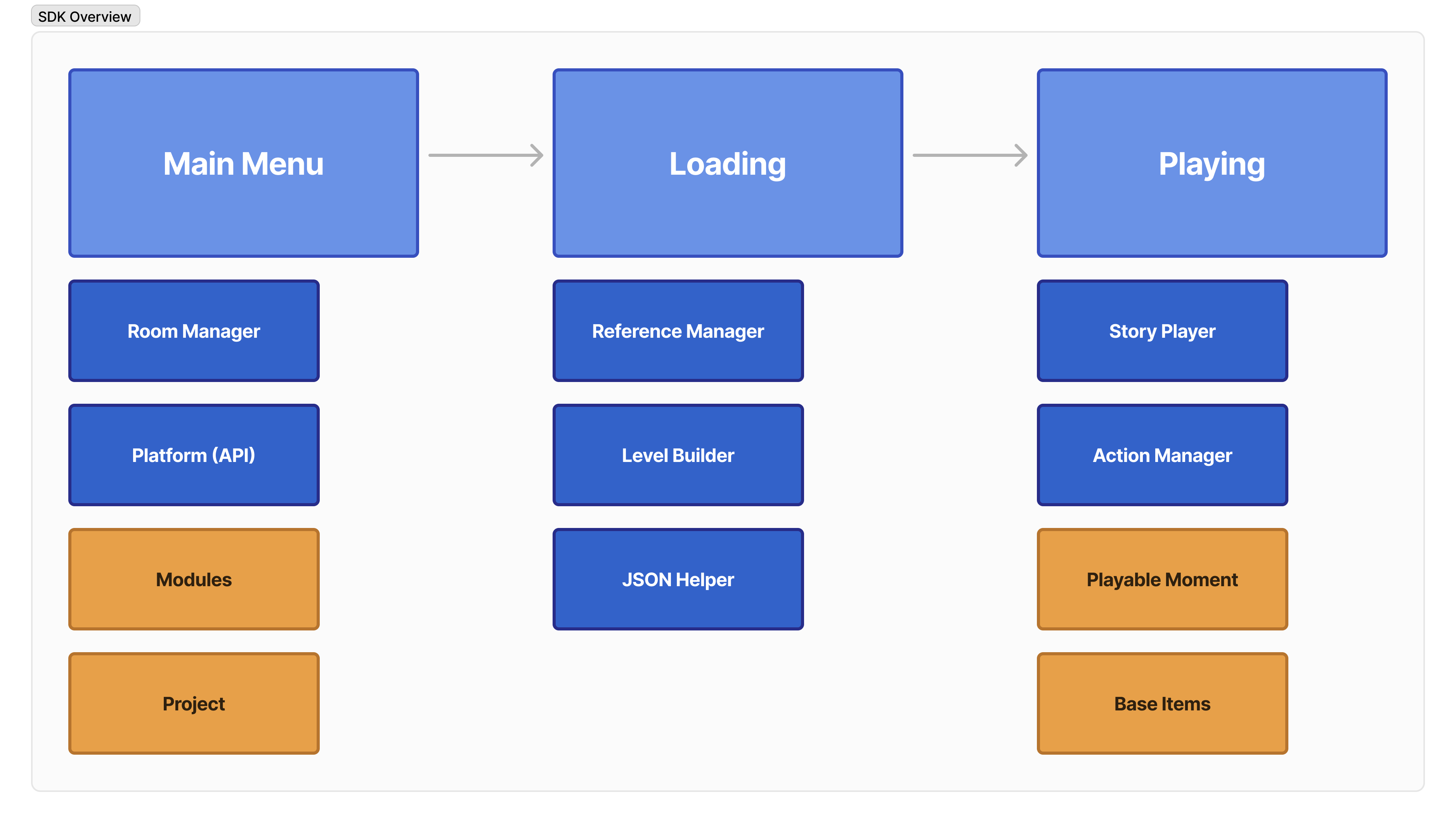
At this layer, your work usually involves:
- Preparing the Dev Scene and Art Scene.
- Linking scene objects to story objects.
- Making objects compatible with VRseBuilder interactions.
- Configuring actions and triggers for each moment.
- Testing story flow inside Unity Play Mode.
- Creating builds for the target headset.
If you have not already read it, start with the Story System introduction. It explains chapters, moments, actions, triggers, and queries, which are the core concepts used throughout the SDK.
Core SDK Concepts
Stories, Chapters, and Moments
The SDK plays VR content as a structured story. A story contains chapters, and chapters contain moments. Each moment defines what the system should do and what the user is expected to do next.
Actions
Actions are things the system performs. Examples include playing a voiceover, showing a UI panel, moving an object, highlighting a tool, starting a timer, or triggering haptics.
Read more in Actions.
Triggers
Triggers are conditions the system waits for. Examples include grabbing an object, touching a target, placing an item correctly, completing a timer, colliding with an object, or answering an MCQ.
Read more in Triggers.
Query Objects
Query objects connect story references to Unity scene objects. If a story action says to highlight a wrench, the SDK needs a query object that identifies which wrench in the scene should be used.
This makes story logic portable while still letting Unity scenes use real GameObjects, prefabs, colliders, renderers, and scripts.
Interactables
Interactables are Unity objects prepared for VR interaction. Depending on the story, an object may need to be grabbable, touchable, placeable, ray-interactable, or simply queryable.
Read more in Interactables.
Typical SDK Workflow
Most projects follow this workflow:
- Set up the Unity project with the correct SDK version and required project settings.
- Create or open the module scenes used for development and art.
- Import or place scene assets such as environments, tools, machines, and UI panels.
- Convert important objects into VRseBuilder-compatible query objects and interactables.
- Configure the story by wiring actions, triggers, references, voiceovers, UI, and warnings.
- Test the experience in Play Mode and on headset.
- Build and deploy the final APK or player build.
Where to Go Next
Environment Setup
Install Unity, open the SDK project, and prepare your workstation.
Project Config Files
Understand the core configuration files and project setup flow.
Interactables
Prepare objects for grabbing, placing, touching, and story references.
Actions and Triggers
Learn what the system can do and what user inputs it can wait for.