> ## Documentation Index
> Fetch the complete documentation index at: https://docs-vrsebuilder.autovrse.app/llms.txt
> Use this file to discover all available pages before exploring further.
# Framework Basics
> Understand how VRseBuilder sits on top of Unity and how it works
## Introduction
VRseBuilder is a comprehensive solution for creating and delivering interactive VR experiences. Whether for training, education, or entertainment, the platform provides the tools and framework needed to build engaging VR content.
## Technology Stack
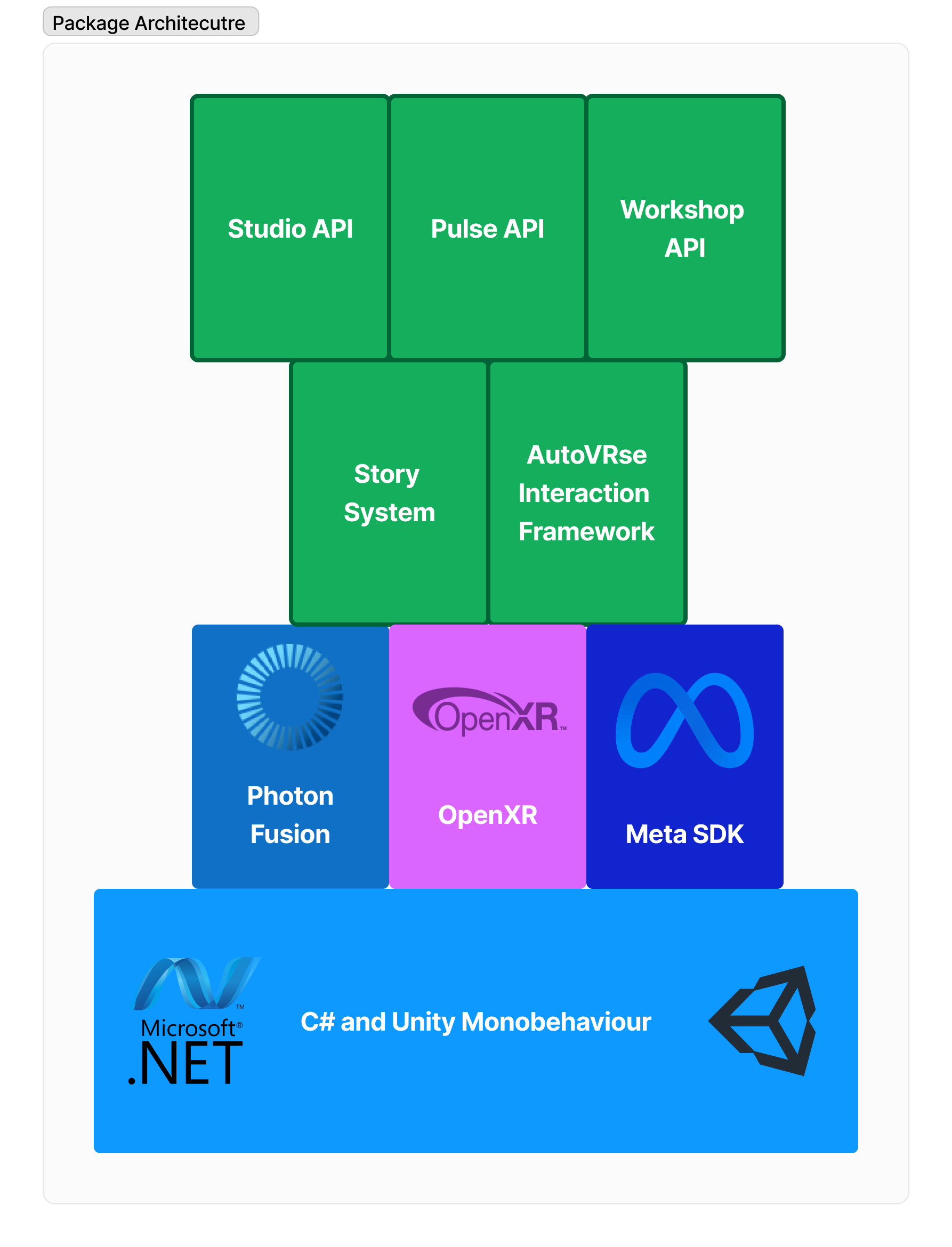 ### Layer Details
#### Foundation Layer
* **Unity Engine**: Provides core game engine functionality
* **.NET Framework**: Offers programming infrastructure
#### VR Integration Layer
* **Meta SDK**: Direct Oculus hardware integration
* **OpenXR**: Cross-platform VR compatibility
#### Core Framework Layer
* **AutoVRse Interaction Framework**: Custom VR interaction system
* **Photon Fusion**: Networking and multiplayer
#### Application Layer
* **Story System**: Experience management
* **Studio API:** Connecting to AI story generator and editor
* **Pulse API:** Connecting to Analytics dashboard
* **Workshop API:** Connecting to Infinity workshop to bring 3D content
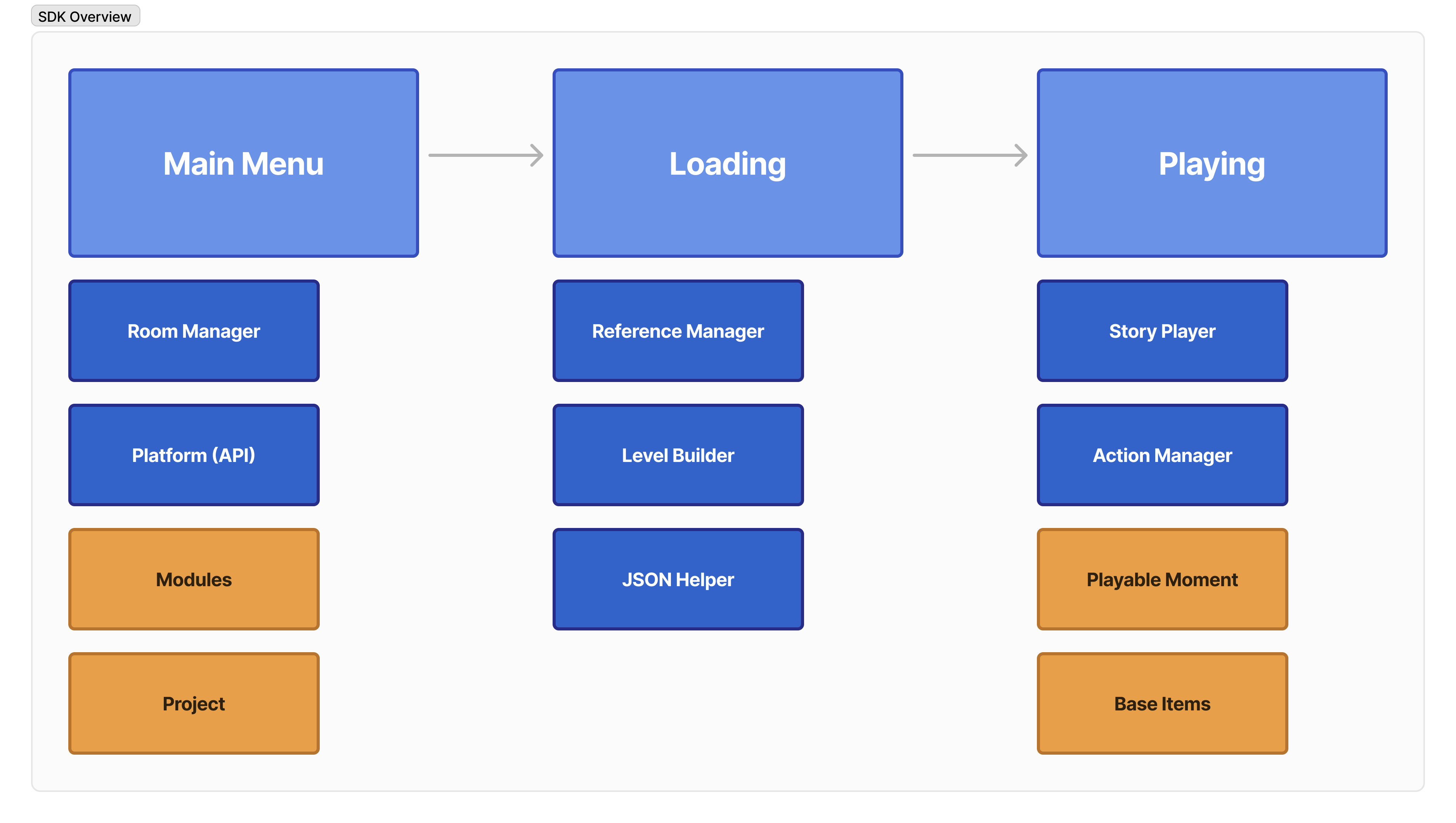
The flowchart below gives a bit more insight on how the application layer flows at runtime
### Layer Details
#### Foundation Layer
* **Unity Engine**: Provides core game engine functionality
* **.NET Framework**: Offers programming infrastructure
#### VR Integration Layer
* **Meta SDK**: Direct Oculus hardware integration
* **OpenXR**: Cross-platform VR compatibility
#### Core Framework Layer
* **AutoVRse Interaction Framework**: Custom VR interaction system
* **Photon Fusion**: Networking and multiplayer
#### Application Layer
* **Story System**: Experience management
* **Studio API:** Connecting to AI story generator and editor
* **Pulse API:** Connecting to Analytics dashboard
* **Workshop API:** Connecting to Infinity workshop to bring 3D content
The flowchart below gives a bit more insight on how the application layer flows at runtime
 At this point you should read about the [design system](/design-system) if you have not already, it will provide some further context on whys of the system mentioned below.
## The Runtime Flow
This section will go over what exactly happens under the hood when a user is experiencing your content in VR
```
1. Story Loading -> 2. Chapter Execution -> 3. Moment Playback -> 4. Action/Trigger Loop
```
Breaking down a Story
* The entire experience is a **Story**
* The story is divided into **Chapters**
* Each chapter contains **Moments**
* Moments are made up of **Actions** and **Triggers**
### 1. Story Loading
When a user starts an experience:
* The system loads the story JSON file
* Sets up required resources and scenes
* Prepares the first chapter
### 2. Chapter Execution
A chapter represents a major section of the experience:
* Manages its sequence of moments
* Controls transitions between moments
* Handles chapter-specific resources
### 3. Moment Playback
Moments are individual interactive sequences:
* Can play voice-overs
* Move or animate objects
* Wait for user interactions
* Update UI elements
### 4. Action/Trigger Loop
The core interaction loop within moments:
1. Execute actions (like showing a message)
2. Wait for triggers (like user grabbing an object)
3. Execute more actions in response
4. Move to next moment when complete
## Key Manager Classes
```
StoryManager (Controls overall experience)
│
├── ReferenceManager (Handles all object references)
│
├── ActionManager (Executes actions)
│
└── TriggerManager (Monitors user interactions)
```
## Example Flow
For a simple training scenario:
1. **Story Starts**
* Load training environment
* Set up initial state
2. **Chapter Begins**
* "Introduction to Lab Equipment"
* Prepare lab scene
3. **First Moment**
* Action: Play voice-over "Pick up the beaker"
* Action: Highlight the beaker
* Trigger: Wait for user to grab beaker
* Action: Play success sound when grabbed
4. **Next Moment**
* Action: Play voice-over "Place beaker on marked spot"
* Action: Highlight target location
* Trigger: Wait for correct placement
* Action: Move to next moment
## Two Core Systems
### 1. Action System
* Handles everything the system DOES
* Examples:
* Playing voice-overs
* Moving objects
* Showing UI elements
* Playing animations
### 2. Trigger System
* Handles everything the system WAITS FOR
* Examples:
* User grabbing objects
* Objects colliding
* Timers completing
* Objects being placed correctly
## The JSON Connection
All experiences are defined in JSON:
```json theme={null}
{
"story": {
"chapters": [
{
"moments": [
{
"actions": [...],
"triggers": [...],
"onComplete": [...]
}
]
}
]
}
}
```
This JSON:
* Defines the structure of the experience
* Specifies what happens in each moment
* Controls the flow between moments
* Can be created through tools or hand-written
## Real World Example
A lab safety training experience might look like:
1. **Story**: Lab Safety Training
2. **Chapters**:
* Introduction to Lab
* Safety Equipment
* Emergency Procedures
3. **Moments** (in Safety Equipment chapter):
* Locate safety goggles
* Put on safety goggles
* Find fire extinguisher
* Learn extinguisher operation
4. **Actions/Triggers** (in "Put on safety goggles" moment):
* Action: Highlight goggles
* Action: Play voice-over instruction
* Trigger: Wait for user to grab goggles
* Action: Guide goggles to face
* Trigger: Wait for correct placement
* Action: Play success feedback
At this point you should read about the [design system](/design-system) if you have not already, it will provide some further context on whys of the system mentioned below.
## The Runtime Flow
This section will go over what exactly happens under the hood when a user is experiencing your content in VR
```
1. Story Loading -> 2. Chapter Execution -> 3. Moment Playback -> 4. Action/Trigger Loop
```
Breaking down a Story
* The entire experience is a **Story**
* The story is divided into **Chapters**
* Each chapter contains **Moments**
* Moments are made up of **Actions** and **Triggers**
### 1. Story Loading
When a user starts an experience:
* The system loads the story JSON file
* Sets up required resources and scenes
* Prepares the first chapter
### 2. Chapter Execution
A chapter represents a major section of the experience:
* Manages its sequence of moments
* Controls transitions between moments
* Handles chapter-specific resources
### 3. Moment Playback
Moments are individual interactive sequences:
* Can play voice-overs
* Move or animate objects
* Wait for user interactions
* Update UI elements
### 4. Action/Trigger Loop
The core interaction loop within moments:
1. Execute actions (like showing a message)
2. Wait for triggers (like user grabbing an object)
3. Execute more actions in response
4. Move to next moment when complete
## Key Manager Classes
```
StoryManager (Controls overall experience)
│
├── ReferenceManager (Handles all object references)
│
├── ActionManager (Executes actions)
│
└── TriggerManager (Monitors user interactions)
```
## Example Flow
For a simple training scenario:
1. **Story Starts**
* Load training environment
* Set up initial state
2. **Chapter Begins**
* "Introduction to Lab Equipment"
* Prepare lab scene
3. **First Moment**
* Action: Play voice-over "Pick up the beaker"
* Action: Highlight the beaker
* Trigger: Wait for user to grab beaker
* Action: Play success sound when grabbed
4. **Next Moment**
* Action: Play voice-over "Place beaker on marked spot"
* Action: Highlight target location
* Trigger: Wait for correct placement
* Action: Move to next moment
## Two Core Systems
### 1. Action System
* Handles everything the system DOES
* Examples:
* Playing voice-overs
* Moving objects
* Showing UI elements
* Playing animations
### 2. Trigger System
* Handles everything the system WAITS FOR
* Examples:
* User grabbing objects
* Objects colliding
* Timers completing
* Objects being placed correctly
## The JSON Connection
All experiences are defined in JSON:
```json theme={null}
{
"story": {
"chapters": [
{
"moments": [
{
"actions": [...],
"triggers": [...],
"onComplete": [...]
}
]
}
]
}
}
```
This JSON:
* Defines the structure of the experience
* Specifies what happens in each moment
* Controls the flow between moments
* Can be created through tools or hand-written
## Real World Example
A lab safety training experience might look like:
1. **Story**: Lab Safety Training
2. **Chapters**:
* Introduction to Lab
* Safety Equipment
* Emergency Procedures
3. **Moments** (in Safety Equipment chapter):
* Locate safety goggles
* Put on safety goggles
* Find fire extinguisher
* Learn extinguisher operation
4. **Actions/Triggers** (in "Put on safety goggles" moment):
* Action: Highlight goggles
* Action: Play voice-over instruction
* Trigger: Wait for user to grab goggles
* Action: Guide goggles to face
* Trigger: Wait for correct placement
* Action: Play success feedback