Introduction
The VRseBuilder story system turns an idea, SOP, training flow, or interactive narrative into a sequence of VR moments.
It gives authors and developers a shared language for three questions:
- What should happen in the scene?
- When should the user act?
- How should the experience respond when the user is right, wrong, or inactive?
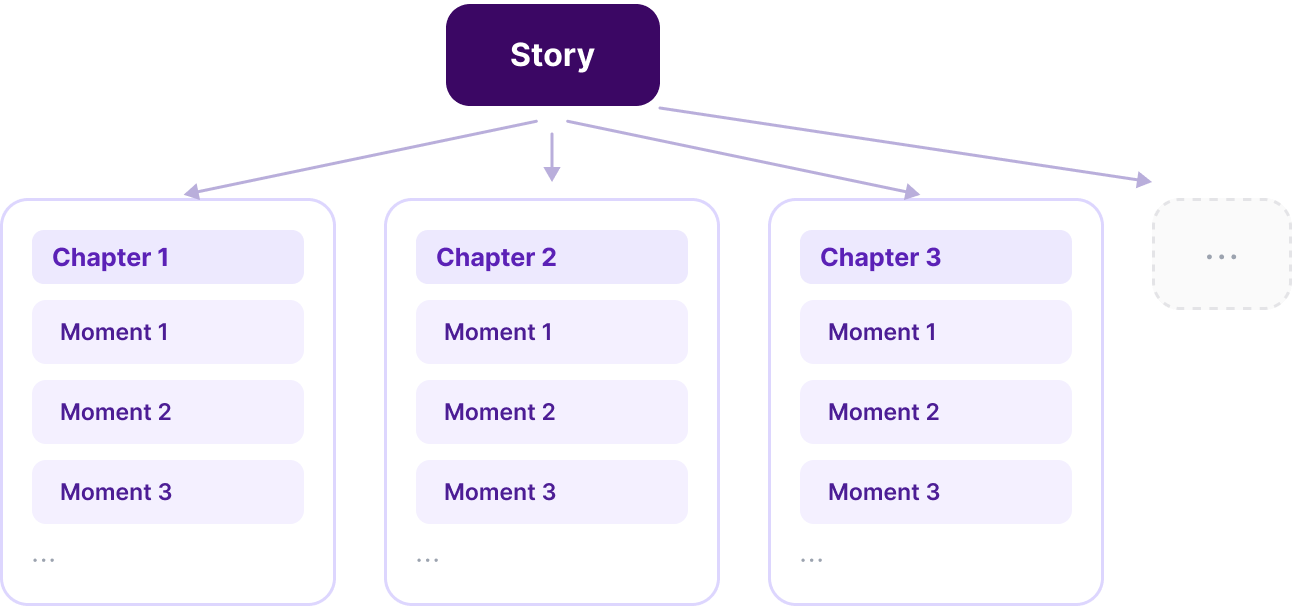
At a high level, every VRseBuilder story is built from three layers:
| Layer | What it means |
|---|---|
| Story | The complete VR experience. |
| Chapter | A major section of the story, usually representing a phase, task area, or scene objective. |
| Moment | A single interactive beat or learning objective inside a chapter. |
Story Structure
A moment is the smallest meaningful unit in the story system. It usually contains one objective and one or more interactions that the user must complete.
Examples of moments:
- Pick up the correct tool.
- Inspect a machine part.
- Place an object in the correct location.
- Answer a question on a panel.
- Wait for narration or visual guidance before proceeding.
Chapters group related moments together, and the full story is made by sequencing those chapters.
VRseBuilder currently supports linear story patterns. A story moves from one moment to the next in a defined sequence, which makes it ideal for guided procedures, training flows, and structured simulations.
Branching story patterns are coming soon. This will allow stories to split into different paths based on user choices, outcomes, roles, or scenario conditions.
Core Building Blocks
Every moment is made from three core concepts: actions, triggers, and queries.
Use this mental model:
- Actions change the scene or story state.
- Triggers listen for the user to do something.
- Queries connect both of them to real scene objects.
| Concept | Purpose | Examples |
|---|---|---|
| Action | Changes something in the scene or story state. | Play a voiceover, show a panel, move an object, highlight a part. |
| Trigger | Waits for the user to do something. | Grab an object, place an object, press a button, touch a target. |
| Query | Identifies the scene object an action or trigger refers to. | A valve, wrench, checklist panel, machine part, or place point. |
Think of a moment as a small contract:
The story performs actions, waits for the right trigger, then moves forward when the user completes the expected interaction.
Moment Lifecycle
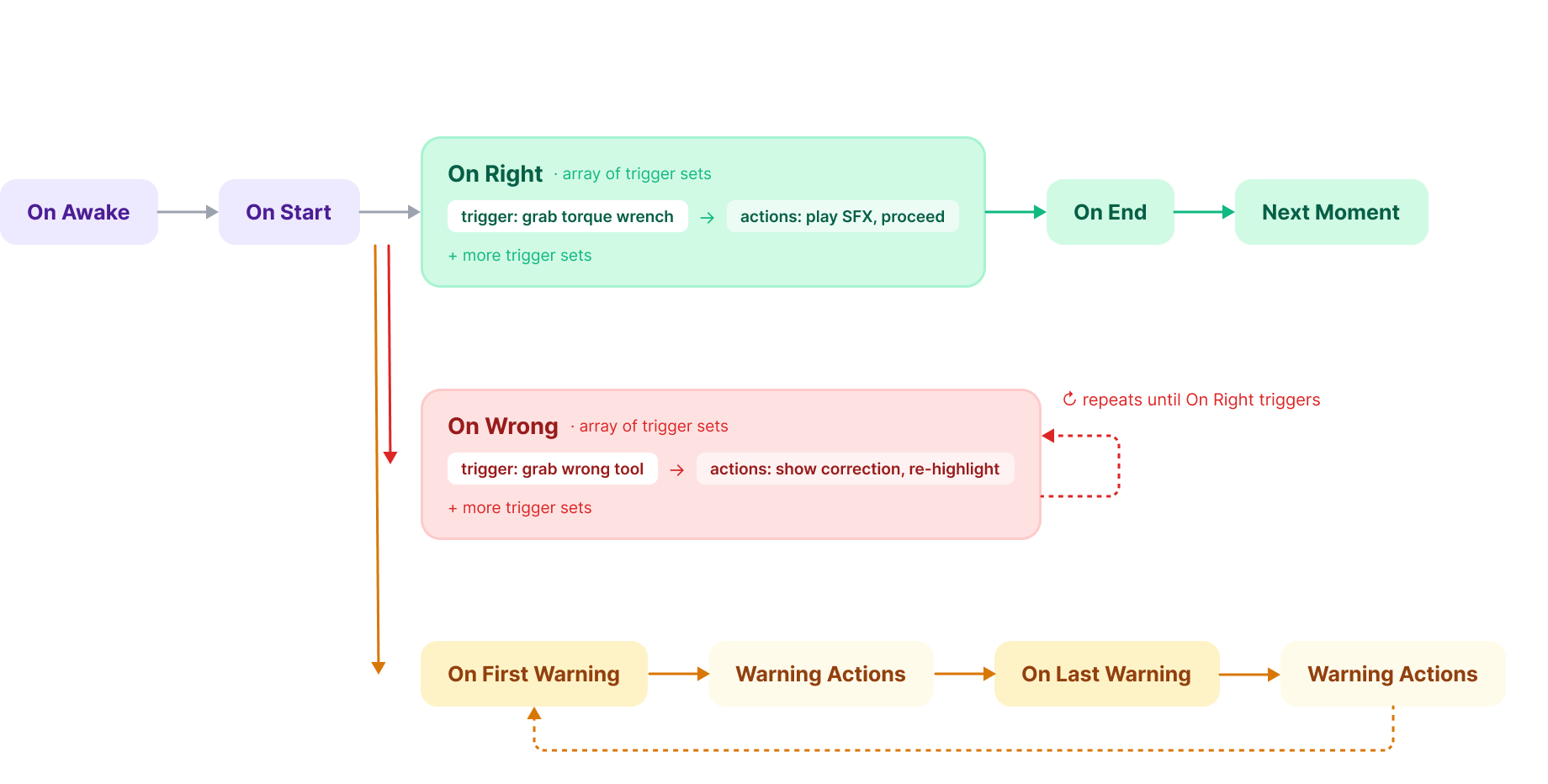
Each moment has a lifecycle. The lifecycle defines:
- When setup actions run.
- When the user is expected to act.
- Which triggers count as right or wrong.
- How the system guides the user if they get stuck or make a mistake.
Lifecycle Sections
| Section | What it is used for |
|---|---|
| On Awake | Prepare the moment before it starts. Use this for setup such as hiding, showing, placing, or resetting objects. |
| On Start | Present context to the user. Use this for voiceovers, instructions, highlights, UI panels, or initial animations. |
| On Right | Define the trigger or trigger set that marks the moment as successfully completed, then run the success actions. |
| On Wrong | Define incorrect triggers and the corrective actions that should follow. |
| On First Warning | Provide the first hint if the user is inactive or confused. The timing is configurable. |
| On Last Warning | Provide stronger guidance if the user still has not completed the expected interaction. The timing is configurable. |
| On End | Clean up the moment and prepare the story to move to the next moment. |
Recommended Authoring Pattern
Most moments follow this pattern:
- Set up the scene with
On Awake. - Tell or show the user what to do with
On Start. - Wait for the expected interaction with an
On Righttrigger. - Handle mistakes with
On Wrong. - Guide the user if they hesitate with warning actions.
- Clean up and transition with
On End.
This keeps each moment focused, predictable, and easier to debug.
Example Moment
| Lifecycle section | Example content |
|---|---|
| On Awake | Enable the tool and disable unrelated objects. |
| On Start | Play a voiceover: "Pick up the torque wrench." Highlight the wrench. |
| On Right | User grabs the torque wrench. |
| On Wrong | User grabs the wrong tool. Show a correction message and highlight the wrench again. |
| On First Warning | Repeat a short hint after a delay. |
| On Last Warning | Show stronger visual guidance, such as an outline or arrow. |
| On End | Remove the highlight and proceed to the next moment. |
How to Think About Story Design
When designing a VR story, avoid thinking only in terms of screens or narration. Instead, think in terms of what the user needs to do and how the world should respond.
Good moments are usually:
- Specific: The user has one clear objective.
- Observable: The system can detect whether the user completed the objective.
- Recoverable: Wrong actions guide the user instead of simply blocking progress.
- Contextual: Voiceovers, highlights, UI, and object behavior help the user understand the next step.
Once this structure is clear, the rest of the story system becomes easier to understand: actions define what the world does, triggers define what the user must do, and queries connect both to real scene objects.