> ## Documentation Index
> Fetch the complete documentation index at: https://docs-vrsebuilder.autovrse.app/llms.txt
> Use this file to discover all available pages before exploring further.
# Introduction
> Welcome to VRseBuilder Documentation
VRseBuilder is an AI-powered no-code design system and Unity SDK for creating and deploying VR training applications. It has been designed, from the ground up, to create and deploy VR applications fast, at scale.
## The Suite
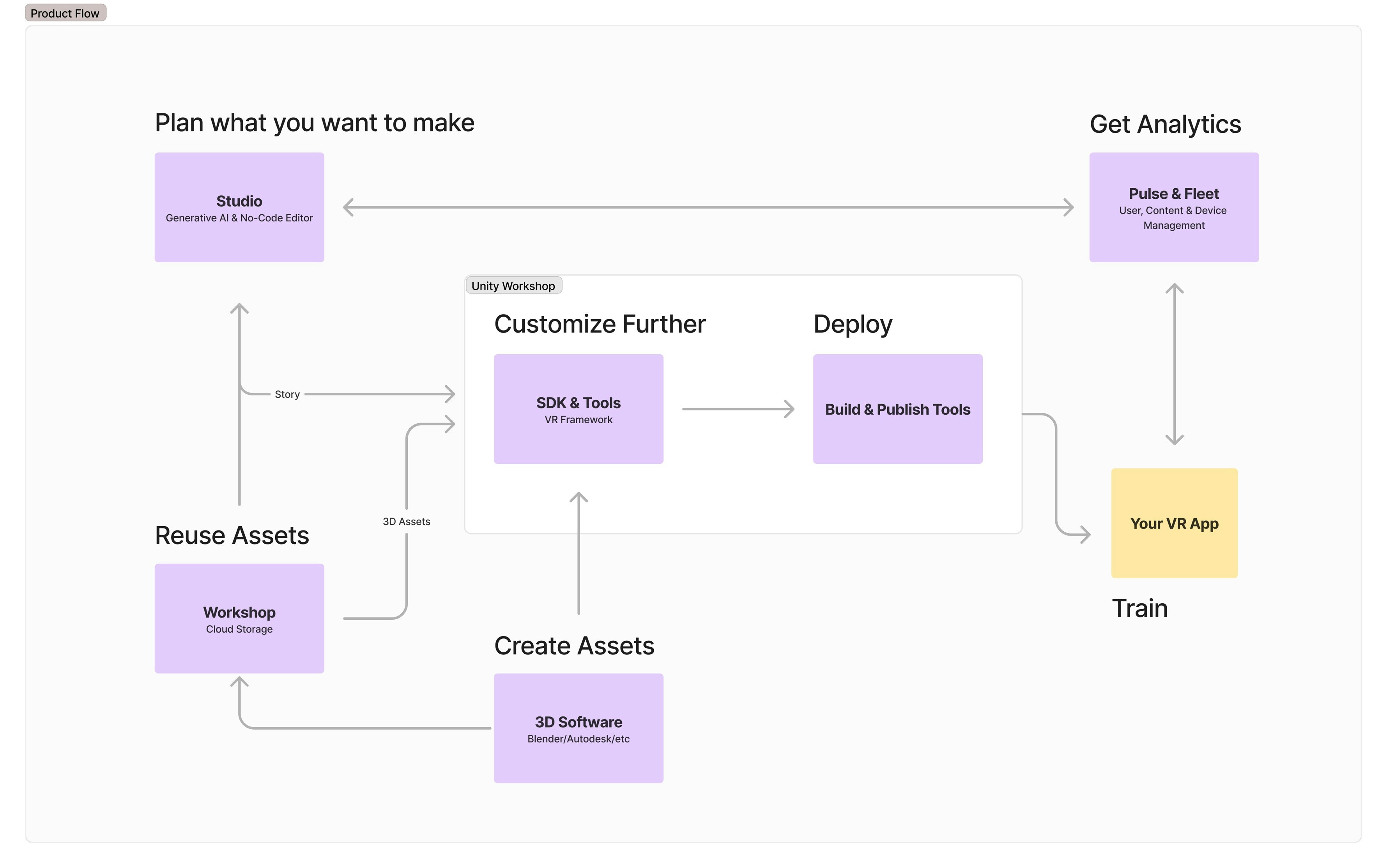
Use the AI-powered generator to create and edit the story that you want to see in VR
Select 3D assets from our library which offers a wide variety of industrial models, or bring your own
Use the SDK to compile all assets and story, finetune, and add more advanced or custom interactions
Use the tooling to easily build (an apk) and publish your story to Meta Quest Store or any other platform of your choice
Your app gets connected to the dashboard, create users for your application and start collecting valuable insights
 ## Essentials
Explore VRseBuilder's design system, workflow, and setup.
Get familiar with the basics
A recommended pipeline for using the suite
Learn how to install various components of the suite
## Essentials
Explore VRseBuilder's design system, workflow, and setup.
Get familiar with the basics
A recommended pipeline for using the suite
Learn how to install various components of the suite